TCP(2019-11-12)
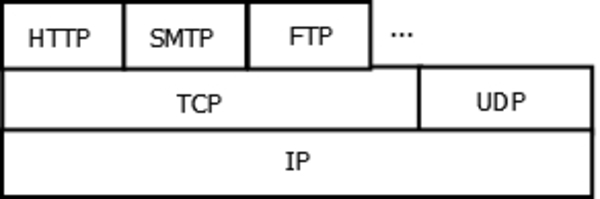
The Transmission Control Protocol (TCP) is one of the main protocols of the Internet protocol suite. It originated in the initial network implementation in which it complemented the Internet Protocol (IP). Therefore, the entire suite is commonly referred to as TCP/IP. TCP provides reliable, ordered, and error-checked delivery of a stream of octets (bytes) between applications running on hosts communicating via an IP network. Major internet applications such as the World Wide Web, email, remote administration, and file transfer rely on TCP. Applications that do not require reliable data stream service may use the User Datagram Protocol (UDP), which provides a connectionless datagram service that emphasizes reduced latency over reliability.
IOT Networkprotokolls(2019-11-12)
- HTTP
- with REST
- Constrained Application Protocol (CoAP) based on UDP
- MQTT
- KAFKA
- Blynk
Mostly it is sensefull to use standardised protocols
IOT Networkprotokolls(2019-11-12)
MQTT(2019-11-12)
The MQTT protocol runs on TCP / IP or other network protocols and provides an ordered, lossless, bidirectional connection. Features include:
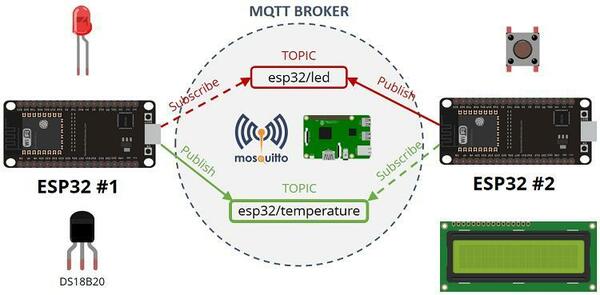
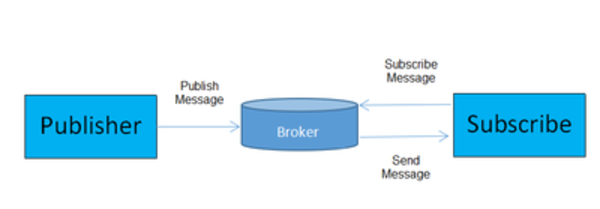
- The publish / subscribe messaging pattern used, which provides one-to-many messaging for decoupling from the application.
- Message-masking mechanism for payload content.
- There are three Quality of Service (QoS) for transmitting messages:
- At most, messages of this level may be lost or duplicated, and message postings depend on the underlying TCP / IP network. That is: <= 1
- At one time, this level will ensure that the message arrives, but the message may be repeated. That is:> = 1
- Only once, make sure the message arrives only once. That is: = 1. In some demanding billing systems, you can use this level Data transfer and protocol exchange is minimized (protocol header only 2 bytes) to reduce network traffic
- Notification mechanism, notify the transmission of both sides when an exception occurs
MQTT - UseCase
MQTT
MQTT
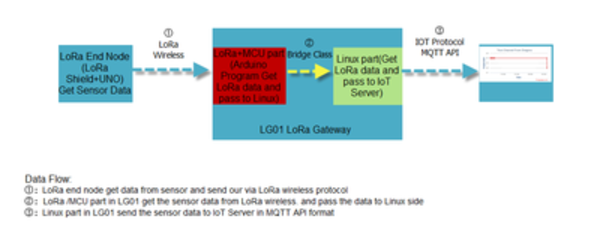
MQTT
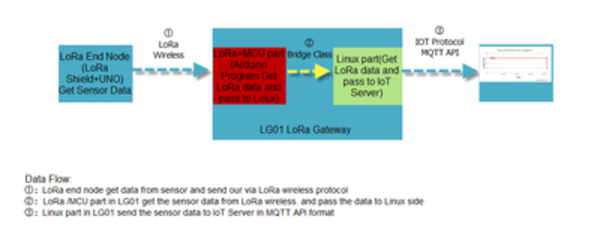
MQTT
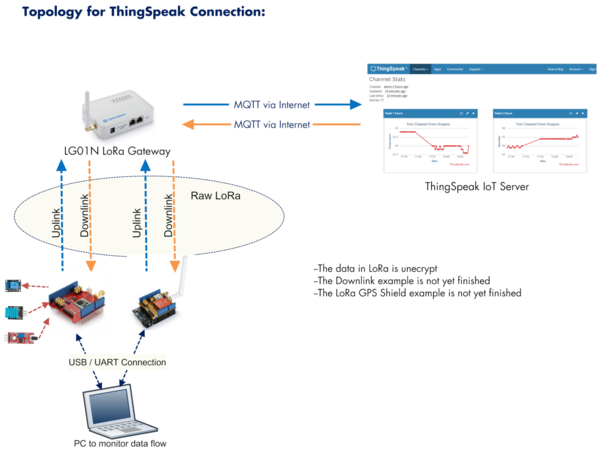
MQTT
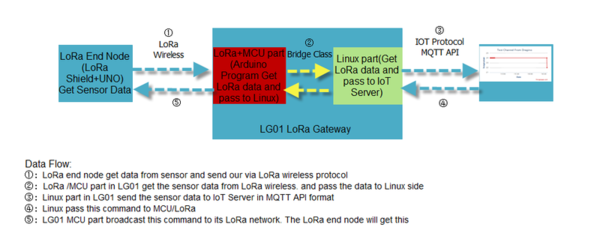
MQTT - Message structure
- topic
- payload
MQTT TOPIC
You can subscribe to a topic. You can just subscribe one special topic like
mosquitto_sub -h localhost -t channel/sensor/deviceid
- -t subscribe to topic
- -h The broker adress
MQTT TOPIC Wildcards
For subcribing you can use wildcards
mosquitto_sub -h localhost -t channel/#
mosquitto_sub -h localhost -t sensor/#
the # works only on the end of a subscribed topic
MQTT TOPIC Wildcards
mosquitto_sub -h localhost -t channel/+/temp
mosquitto_sub -h localhost -t sensor/+/90008
MQTT QoS (Quality of Service)
- At most once (0) called “fire and forget”
- At least once (1)
- Exactly once (2).
Configure the LG02 with MQTT
We used the LG02 to do it in some small projects
Configure the LG02 with TTN
We also tried some TTN-Configurations with TTN-Asia in the workshop
Configure Mosquitto
LORAWAN
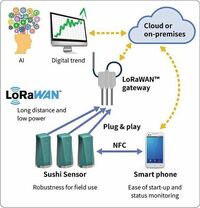
LoRaWAN is a media access control (MAC) protocol for wide area networks. It is designed to allow low-powered devices to communicate with Internet-connected applications over long range wireless connections. LoRaWAN can be mapped to the second and third layer of the OSI model. It is implemented on top of LoRa or FSK modulation in industrial, scientific and medical (ISM) radio bands. The LoRaWAN protocols are defined by the LoRa Alliance and formalized in the LoRaWAN Specification which can be downloaded on the LoRa Alliance website.
LORAWAN
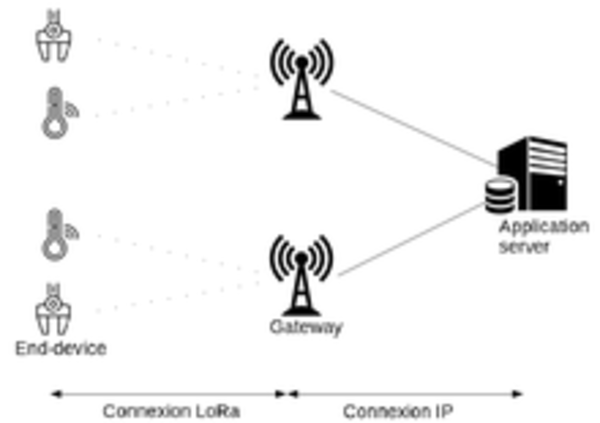
LORAWAN Topology

The Dragino LG02 Gateway(2019-11-12)
- LG02 can be used to provide a low cost IoT wireless solution to support 50~300 sensor nodes.
- Except LoRaWAN mode, LG02 can support multiply working mode such as:
- LoRa repeater mode,
- MQTT mode,
- TCP/IP Client mode,
- TCP/IP Server mode
For MQTT Downlink/Subscribe you need to program with the Bridge-Library some extensions. I like to send some examples after being home.
to fit different requirement for IoT connection.
Dragino Gateway
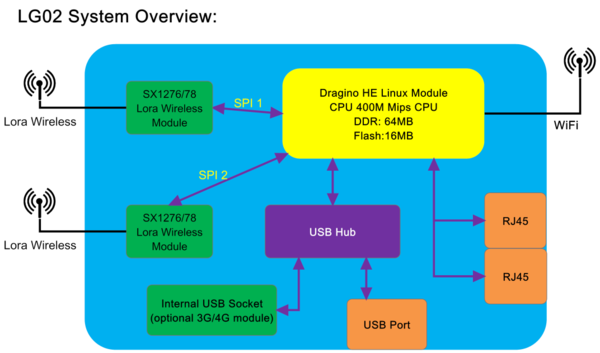
full featured LORAWAN-Gateways
You find a list of fullfeatured LORAWAN gateways here
MOSQUITTO The Broker
I installed for you
mosquitto-Konfiguration and first experiments
- Config in the
/etc/mosquitto/mosquitto.conf - start mosquitto like this
mosquitto -v - Test mosquitto
- SUBSCIBE:
mosquitto_sub -h localhost -t test - PUBLISH:
mosquitto_pub -h localhost -t test -m "Hello World!" - create a password-file and a first password with
sudo mosquitto_passwd -c /etc/mosquitto/passwd tptc(in this case the password I used tptc also as password)- add further password to this file (Attention Use the same filename)
sudo mosquitto_passwd -b /etc/mosquitto/passwd paulsen xxxxmosquitto_pub -h mqtt.thingspeak.com -p 1883 -u dragino -P QZXTAKE88V3S7O2J -i dragino_Client -t channels/200893/publish/B9Z0R25QNVEBKIFY -m "field1=34&field2=89&status=MQTTPUBLISH"- last not least use this for subscribe to the channel and store the messages into the file /home/paulsen/tmp/tptc-messages
- mosquitto_sub -h localhost -u paulsen -P xxxx -t channel/908020/temp > /home/paulsen/tmp/tptc-messages
- show the file content on linux with tail -f|less tmp/tptc-messages
sudo mosquitto_passwd -c /etc/mosquitto/passwd tptc
mosquitto_sub -h localhost -t test mosquitto_pub -h localhost -t test -m "Hello World!" sudo mosquitto_passwd -c /etc/mosquitto/passwd tptc