What is a Broker(2019-11-12)
A message broker (also known as an integration broker or interface engine}) is an intermediary computer program module that translates a message from the formal messaging protocol of the sender to the formal messaging protocol of the receiver. Message brokers are elements in telecommunication or computer networks where software applications communicate by exchanging formally-defined messages.[1] Message brokers are a building block of message-oriented middleware (MOM) but are typically not a replacement for traditional middleware like MOM and remote procedure call (RPC).
system architecture of IoT(2019-11-12)
- messurement with sensor (input)
- controlling output devices
- microcontrollers for regulate and control
- network protocols of IOT
The IP-Stack for IOT(2019-11-12)
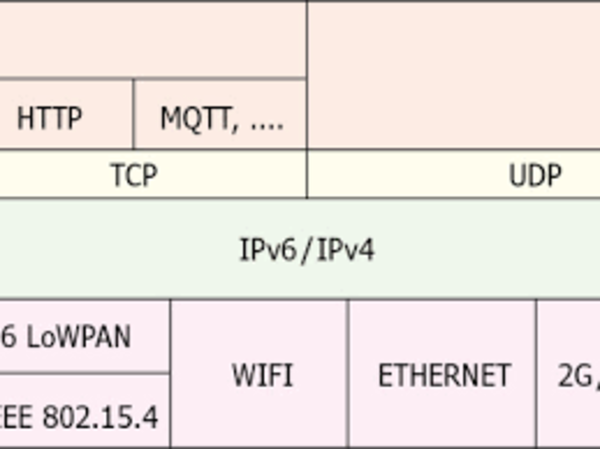
UDP User Datagram Protocol
In computer networking, the User Datagram Protocol (UDP) is one of the core members of the Internet protocol suite. The protocol was designed by David P. Reed in 1980 and formally defined in RFC 768. With UDP, computer applications can send messages, in this case referred to as datagrams, to other hosts on an Internet Protocol (IP) network. Prior communications are not required in order to set up communication channels or data paths.
UDP Applications(2019-11-12)
Numerous key Internet applications use UDP, including:
1.the Domain Name System (DNS), where queries must be fast and only consist of a single request followed by a single reply packet,
- the Simple Network Management Protocol (SNMP),
- the Routing Information Protocol (RIP)
- the Dynamic Host Configuration Protocol (DHCP).
UDP Broadcast(2019-11-12)
UDP broadcast is a technique that allows sending UDP datagram from a single source to all computers in a LAN. In order to send a UDP datagram addressed to all computers in the local area network it needs to be sent to a special address called the Broadcast address.
UDP Multicast(2019-11-12)
In computer networking, multicast is group communication[1] where data transmission is addressed to a group of destination computers simultaneously. Multicast can be one-to-many or many-to-many distribution.[2] Multicast should not be confused with physical layer point-to-multipoint communication. The MulticastSocket class defined in the java.net package represents a multicast socket. Once a MulticastSocket object is created, the joinGroup() method is invoked to make it one of the members to receive a multicast message. Note that a multicast IP address is defined in the range of 224.0.0.0 to 239.255.255.255. Following is the IP multicast address ranges and uses.
Simple Network Management Protocol (SNMP)
... is an Internet Standard protocol for collecting and organizing information about managed devices on IP networks and for modifying that information to change device behavior. Devices that typically support SNMP include cable modems, routers, switches, servers, workstations, printers, and more.[1]
SNMP is widely used in network management for network monitoring. SNMP exposes management data in the form of variables on the managed systems organized in a management information base (MIB) which describe the system status and configuration. These variables can then be remotely queried (and, in some circumstances, manipulated) by managing applications. There are some good examples for using SNMP for broadcasting sensor messages in the internet.
UDP Broadcast in Java(2019-11-12)
public class BroadcastingClient {
    private static DatagramSocket socket = null;

    public static void main((String[] args)) throws IOException {
        broadcast("Hello", InetAddress.getByName("255.255.255.255"));
    }

    public static void broadcast(
      String broadcastMessage, InetAddress address) throws IOException {
        socket = new DatagramSocket();
        socket.setBroadcast(true);

        byte[] buffer = broadcastMessage.getBytes();
}
       DatagramPacket packet
          = new DatagramPacket(buffer, buffer.length, address, 4445);
        socket.send(packet);
        socket.close();
    }
}
This special address 255.255.255.255(2019-11-12)
255.255.255.255 is a special broadcast address, which means "this network": it lets you send a broadcast packet to the network you're connected to, without actually caring about its address; in this, is similar to 127.0.0.1, which is a virtual address meaning "local host".
Find all Broadcastadresses(2019-11-12)
List<InetAddress> listAllBroadcastAddresses() throws SocketException {
    List<InetAddress> broadcastList = new ArrayList<>();
    Enumeration<NetworkInterface> interfaces
      = NetworkInterface.getNetworkInterfaces();
    while (interfaces.hasMoreElements()) {
        NetworkInterface networkInterface = interfaces.nextElement();

        if (networkInterface.isLoopback() || !networkInterface.isUp()) {
            continue;
        }
      networkInterface.getInterfaceAddresses().stream()
          .map(a -> a.getBroadcast())
          .filter(Objects::nonNull)
          .forEach(broadcastList::add);
    }
    return broadcastList;
}
Multicast with arduino and EthernetShield(2019-11-12)
#include <SPI.h>         // needed for Arduino versions later than 0018
#include <Ethernet.h>
#include <Udp.h>         // UDP library from: [email protected] 12/30/2008


// Enter a MAC address and IP address for your controller below.
// The IP address will be dependent on your local network:

byte mac[] = {
  0xDE, 0xAD, 0xBE, 0xEF, 0xFE, 0xED };
byte ip[] = {
  192,168,100,177 };
unsigned int localPort = 8888;      // local port to listen on

// Multicast
byte ipMulti[] = {
  239,0,0,57 };
unsigned int portMulti = 12345;      // local port to listen on

// the next two variables are set when a packet is received
byte remoteIp[4];        // holds received packet's originating IP
unsigned int remotePort; // holds received packet's originating port

// buffers for receiving and sending data
char packetBuffer[UDP_TX_PACKET_MAX_SIZE]; //buffer to hold incoming packet,
char  ReplyBuffer[] = "acknowledged";       // a string to send back
Multicast with arduino and EthernetShield SETUP(2019-11-12)
void setup() {
  // start the Ethernet and UDP:
  Ethernet.begin(mac,ip);
// original unicast UDP
  //Udp.begin(localPort);
// multicast UDP
  Udp.beginMulti(portMulti, ipMulti);

  Serial.begin(9600);
}
Multicast with arduino and EthernetShield LOOP(2019-11-12)
void loop() {
  // if there's data available, read a packet
  int packetSize = Udp.available(); // note that this includes the UDP header
  if(packetSize)
  {
    packetSize = packetSize - 8;      // subtract the 8 byte header
    Serial.print("Received packet of size ");
    Serial.println(packetSize);

    // read the packet into packetBufffer and get the senders IP addr and port number
    Udp.readPacket(packetBuffer,UDP_TX_PACKET_MAX_SIZE, remoteIp, remotePort);
    Serial.println("Contents:");
    Serial.println(packetBuffer);
    Udp.sendPacket( ReplyBuffer, remoteIp, remotePort);
  }
  delay(10);
}