Bussystems for the Arduino, ESP32 and other Microcontroller
With a system bus you can connect more sensors than without one, only using one on a pin.
Connect Arduinos over I2C(2019-11-12)
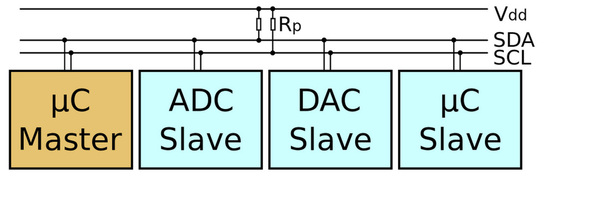
Connect Arduinos over I2C*(2019-11-12)
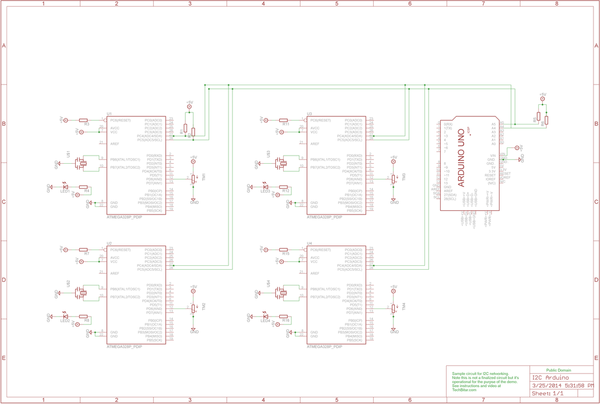
I2C-Master Sketch(2019-11-12)
#include <Wire.h>

#define PAYLOAD_SIZE 2 // how many bytes to expect from each I2C salve node
#define NODE_MAX 6 // maximum number of slave nodes (I2C addresses) to probe
#define START_NODE 2 // The starting I2C address of slave nodes
#define NODE_READ_DELAY 1000 // Some delay between I2C node reads

int nodePayload[PAYLOAD_SIZE];

void setup()
{
  Serial.begin(9600);
  Serial.println("MASTER READER NODE");
  Serial.print("Maximum Slave Nodes: ");
  Serial.println(NODE_MAX);
  Serial.print("Payload size: ");
  Serial.println(PAYLOAD_SIZE);
  Serial.println("***********************");

  Wire.begin();        // Activate I2C link
}
I2C-Master Sketch(2019-11-12)
void loop()
{
  for (int nodeAddress = START_NODE; nodeAddress <= NODE_MAX; nodeAddress++) { // we are starting from Node address 2
    Wire.requestFrom(nodeAddress, PAYLOAD_SIZE);    // request data from node#
    if(Wire.available() == PAYLOAD_SIZE) {  // if data size is avaliable from nodes
      for (int i = 0; i < PAYLOAD_SIZE; i++) nodePayload[i] = Wire.read();  // get nodes data
      for (int j = 0; j < PAYLOAD_SIZE; j++) Serial.println(nodePayload[j]);   // print nodes data
      Serial.println("*************************");
      }
    }
    delay(NODE_READ_DELAY);
}
I2C-Slave Sketch(2019-11-12)
#include <Wire.h>

#define NODE_ADDRESS 2  // Change this unique address for each I2C slave node
#define PAYLOAD_SIZE 2 // Number of bytes  expected to be received by the master I2C node

byte nodePayload[PAYLOAD_SIZE];

void setup()
{

  Serial.begin(9600);
  Serial.println("SLAVE SENDER NODE");
  Serial.print("Node address: ");
  Serial.println(NODE_ADDRESS);
  Serial.print("Payload size: ");
  Serial.println(PAYLOAD_SIZE);
  Serial.println("***********************");

  Wire.begin(NODE_ADDRESS);  // Activate I2C network
  Wire.onRequest(requestEvent); // Request attention of master node
}
I2C-Slave Sketch(2019-11-12)
void loop()
{
  delay(100);
  nodePayload[0] = NODE_ADDRESS; // I am sending Node address back.  Replace with any other data
  nodePayload[1] = analogRead(A0)/4; // Read A0 and fit into 1 byte. Replace this line with your sensor value

}

void requestEvent()
{
  Wire.write(nodePayload,PAYLOAD_SIZE);
  Serial.print("Sensor value: ");  // for debugging purposes.
  Serial.println(nodePayload[1]); // for debugging purposes.
}
I2C Circuit
- Resistor 10K Ohm X 2: Pull-up resistors for the I2C SDA SCL lines
- LED X 3: It's nice to have these LEDs to know when wire is applied to the microcontroller.
- Resistor 300 Ohm to 1K Ohm X 3: Used in series with the LEDs.
- Use the sensor out of the kit for demonstrating the Network